
Most shops can build a kitchen to a thousandth. Ask them how they arrived at the price and the answer gets vague. Here is how the three common pricing methods actually work, the number all three depend on, and the specific places a quote quietly loses money.
Why pricing goes wrong even in good shops
Pricing failures are rarely dramatic. A shop that is underpricing by twelve percent does not notice in the way a shop that drops a cabinet notices. The work comes in, the invoices go out, and the bank balance grinds down over two or three years while everyone stays busy. Busy and profitable feel identical from the shop floor. They only separate on the year-end accounts.
The root cause is almost always the same: a price built from the parts the shop can see. Sheet goods, hardware, a rough guess at hours. The costs that do not show up on a cutting list — rent, insurance, the truck, the hours spent quoting jobs you did not win — get left out, then get paid for out of the margin.
The three methods shops actually use
Walk into ten custom cabinet shops and you will find three approaches, often mixed together.
1. Price per linear foot
The oldest method and still the most common. You settle on a rate per linear foot of cabinetry — bases and uppers priced separately — and multiply by the run.
It is fast, a customer understands it, and it makes quoting a kitchen a two-minute job. Its weakness is that a linear foot is not a unit of work. Twelve feet of plain shaker bases and twelve feet of glass-front uppers with interior lighting are the same number of feet and nowhere near the same amount of labor. Shops that price purely by the foot tend to make money on simple jobs and lose it on complicated ones, which is a problem because complicated jobs are the ones you win on skill.
2. Price per box
Assign each cabinet a price by type and size, then add up the boxes. This is how the big producers sell through dealers, with up-charges layered on for door style, species and finish.
Per-box is more honest than per-foot because it tracks the actual number of things you have to build. It handles a run of narrow drawer bases — expensive per foot, cheap per foot of wall — far better. The catch is maintenance: every box needs a price, and those prices need revisiting whenever material costs move.
3. Material and labor multipliers
The rule-of-thumb methods. Contributors on WOODWEB's cabinetmaking knowledge base describe two that have circulated in the trade for decades:
- Material × 3 = selling price
- (Material + labor) × 2 = selling price
One experienced contributor describes running a job through three metrics — per linear foot, per box and per door — and averaging the three results, using figures like $200 per foot, $444 per box and $186 per door as the starting points. The averaging is the clever part: it stops any single method's blind spot from dominating the number.
Multipliers are quick and they are better than nothing. But a multiplier is a fossil. It encodes the overhead structure of whoever invented it, in the year they invented it. If your rent doubled or you took on two employees, the multiplier does not know.
The number all three depend on: your shop rate
Every method above is a shortcut for the same underlying calculation. None of them work unless you know what an hour in your shop actually costs.
A shop rate is not a wage. It is the wage plus the burden plus every cost of keeping the doors open, divided across the hours you can actually sell. Woodworking Network's pricing workshop sets it out simply:
Annual overhead ÷ productive hours = loaded shop rate
Their worked example: $100,000 of annual overhead against 1,500 productive hours — 30 sellable hours a week across 50 weeks — gives a loaded shop rate of $67 per hour.
Note what that 1,500 figure is doing. It is not 40 hours × 52 weeks. A shop that bills every paid hour is a shop that has forgotten about quoting, ordering, machine maintenance, cleanup, chasing invoices and the drive to site. Woodworking Network assumes roughly 30 of 40 hours are sellable. Set that number honestly, because everything downstream scales from it. Assume 40 sellable hours and your rate comes out 25 percent light on every job you quote for the rest of the year.
WOODWEB contributors reach similar territory from the other direction, separating an employee's loaded cost from overhead recovery — roughly $35 an hour for a $25-an-hour employee once burden is counted, plus overhead on top, landing on shop rates in the $57 to $72 range depending on the skill the task demands. Different arithmetic, same order of magnitude.
A quote, start to finish
Here is the Woodworking Network example run through in full, because seeing the shape of it matters more than the specific numbers:
| Line | Working | Amount |
|---|---|---|
| Shop rate recovery | 80 hours × $67 | $5,360 |
| Production labor | 40 hours × 2 workers × $25 | $2,000 |
| Materials | — | $3,000 |
| Subtotal | — | $10,360 |
| Profit | 15% | $1,554 |
| Minimum price | — | $11,914 |
The word doing the work in that last row is minimum. That is the number below which the job costs you money to accept. What you actually charge depends on what the market will carry, how badly you want the job, and what the customer is comparing you against. WOODWEB contributors suggest pricing three to ten percent above your competition signals quality, while going fifteen percent or more above it mostly sends customers to the competition.
Plug your own overhead and hours into that structure and you have a defensible price. Skip the shop rate line and you are quoting labor and materials only, which is the single most common way a busy shop goes broke.
Where quotes actually lose money
Four failures account for most of it.
Hours that never get counted. Delivery, installation, the site visit to measure, the two hours spent redrawing after the customer moved the range. If it is not in the hours, it is coming out of the margin.
Waste priced as if it does not exist. Yield on sheet goods is not 100 percent, and on a job with unusual part sizes it can be a lot worse than your rule of thumb. A cut list generated from the actual design tells you how many sheets the job consumes rather than how many you assumed.
Revisions absorbed silently. The third layout change is not free. Shops that price the first design and then eat every revision are running a design service at no charge alongside a cabinet shop.
Parts that price at zero. This one is worth dwelling on, because it is invisible.
The zero-price trap
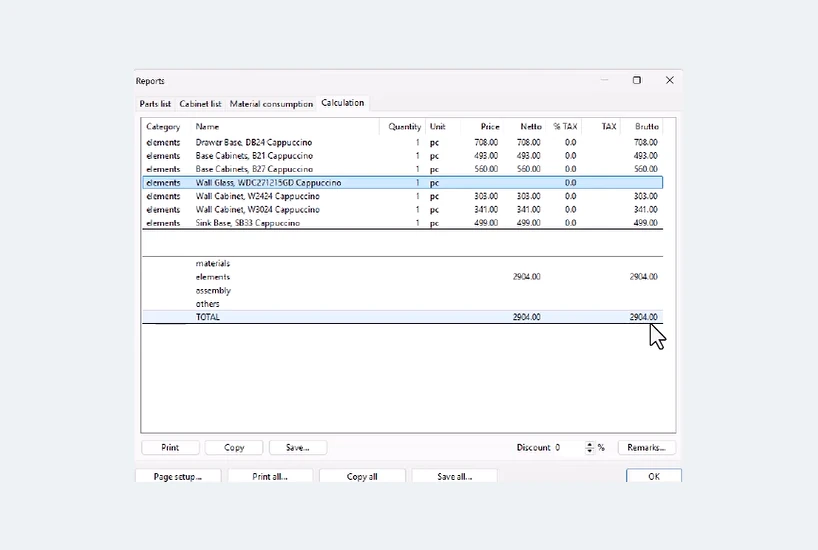
Here is a calculation report from a real kitchen. Six cabinets carry a price. One does not.
Add the priced lines: $708 + $493 + $560 + $303 + $341 + $499 = $2,904. That matches the total exactly. The glass wall cabinet contributed nothing, and nothing in the report complains about it. The quote looks complete. It is short by whatever that cabinet costs to build, and you will not discover it until the job is finished.
This is the failure mode that makes pricing software worth having and also the reason software alone does not save you. A part with no price assigned does not raise an error. It quietly returns zero, the total still adds up, and the document looks finished. Whatever system you use, the discipline is the same: before a quote leaves the building, scan the line items for anything reading zero.
What software changes, and what it does not
The honest version: software does not tell you what to charge. It tells you what you are building, accurately and fast, which is the part humans get wrong.
What it genuinely fixes is the link between the design and the number. When the price is attached to the components in the model, changing the design changes the quote. Swap the door style on eighteen doors and the price moves without anyone re-keying a spreadsheet. Add a cabinet and it appears in the total. That is the difference between a quote that reflects the current design and a quote that reflects the design as it stood on Tuesday.
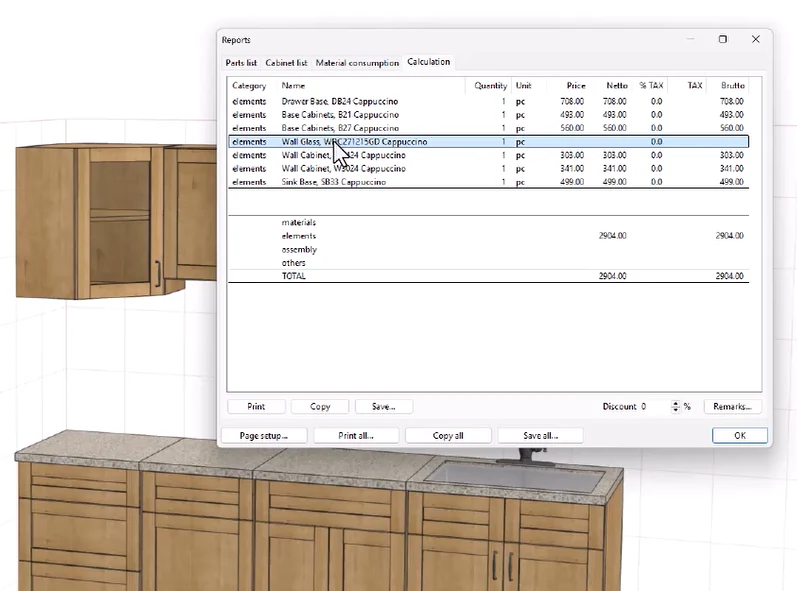
In Pro100, pricing is attached to elements and materials through price IDs, and the calculation report above is generated from the model itself — the same model that produces the cut list and shop drawings. Set your prices once against your own materials and construction, and every job you draw afterwards prices itself. Setting that up is a real piece of work, typically a day to three days, which the post on what actually matters for small shops goes into properly.
What software will not do is decide your shop rate, know your overhead, or judge how much the market will bear. Those stay yours.
How the main packages approach costing
Every serious package in this category — Cabinet Vision, Mozaik, Cabinet Pro, Cabinet Planner, 2020 Design and Pro100 among them — can attach costs to a design and produce a priced report. They differ in how much structure they impose, how much setup they demand before the first accurate number, and how they are licensed.
The licensing difference matters more than it first appears, because it changes what the software costs you per year rather than per job. We worked through the five-year arithmetic in a separate post on what cabinet design software actually costs over five years, and compared the packages feature by feature in cabinet software compared in 2026. Both are worth reading before you commit, and neither is a sales pitch.
Where to start if you price by feel today
- Work out your annual overhead. Everything that is not materials and not production wages. Pull it from last year's accounts rather than estimating.
- Count your genuinely sellable hours. Be pessimistic. Thirty a week per person is a realistic starting point for a small shop.
- Divide one by the other. That is your loaded shop rate.
- Re-price your last completed job using it. Not a hypothetical job — a real one, where you know the final hours and the final material bill.
- Compare that to what you charged. This is the uncomfortable step and the one that changes how you quote.
Shops doing this for the first time commonly find they have been underpricing complex work and overpricing simple work. That is the signature of per-foot pricing without a shop rate underneath it.
The bottom line
Pick whichever method suits how you sell — per foot, per box or a blend. They are all defensible. What is not defensible is running any of them without knowing your loaded shop rate, because every one of those methods is a shortcut for a calculation you have not done.
Do the overhead arithmetic once. Re-price one finished job against it. Then decide whether the way you have been quoting has been paying you.
Frequently asked questions
How do you calculate a shop rate for a cabinet shop?
Divide your annual overhead by the hours you can actually sell. Woodworking Network's worked example puts $100,000 of annual overhead against 1,500 productive hours and arrives at a loaded shop rate of $67 per hour. The critical input is the hours figure: count only genuinely sellable hours, not every paid hour, because quoting, ordering, maintenance and cleanup are not billable.
Should I price cabinets per linear foot or per box?
Per linear foot is faster and customers understand it, but a linear foot is not a unit of work, so shops that price purely by the foot tend to make money on simple jobs and lose it on complicated ones. Per box tracks the actual number of things you have to build and handles unusual runs better, at the cost of maintaining a price for every box.
What is the material times three rule for pricing cabinets?
It is a rule of thumb where material cost is multiplied by three to reach a selling price, alongside a related version where material plus labor is multiplied by two. Both circulate widely in the trade. They are quick and better than nothing, but a multiplier encodes the overhead structure of whoever invented it in the year they invented it, so it will not reflect your rent, your wages or your equipment.
Why do cabinet quotes come out short?
Four causes account for most of it: hours that never get counted such as delivery and site visits, waste priced as if it does not exist, revisions absorbed silently, and parts that price at zero. The last one is the hardest to catch because a component with no price assigned does not raise an error. It returns zero, the total still adds up, and the quote looks finished.
Does cabinet design software tell you what to charge?
No. Software does not decide your shop rate, know your overhead, or judge what the market will bear. What it fixes is the link between the design and the number, so that changing the design changes the quote without anyone re-keying a spreadsheet.
How long does it take to set up pricing in cabinet software?
Setting up pricing against your own materials and construction is a real piece of work, typically a day to three days. Once it is done, every job you draw afterwards prices itself.
See it price a kitchen
The version 7 demo runs the full calculation report. Draw a job, attach your own prices and see the number the model produces.
One-time license, no subscription — see pricing. Questions? Call 800-608-0159.