
If you are paying Mozaik $125 a month and wondering what else is out there, the honest answer is that the software is only half the question. The other half is what it costs to leave — your catalog, your open quotes, and the jobs already sitting on your drive. Nobody writes about that part, so this is that article.
Everything below was checked against Mozaik’s own pricing page on 20 October 2026. Prices change; check before you decide anything.
What happens to your files if you stop paying
This is the question to settle first, because it changes how you plan everything else.
Mozaik is subscription software. When a subscription lapses the application stops launching, and the project files on your own drive generally cannot be opened without it. The drawings are still on your computer. You just have no program that will read them.
That is not unique to Mozaik — it is how most subscription CAD works — but it has a practical consequence that catches shops out: you cannot cancel first and migrate afterwards. Any job you may need to reopen, re-quote or build from has to be dealt with while the subscription is still live.
Before you cancel anything, work through your last two or three years of jobs and export what you would hate to lose — cut lists, elevations, renderings, quote documents — to formats that do not depend on the program. PDF for anything you might show a customer, CSV for parts data. A weekend of exporting is cheaper than one re-measured kitchen.
What Mozaik actually costs, and when buying wins
Mozaik is priced per seat, per month. As of today its own pricing page lists:
- Mozaik Manufacturing — $125/month
- Mozaik CNC — $225/month
- Mozaik Enterprise — $325/month
- Additional seats — $60/month each, on any tier
- An annual commitment takes 10% off, the first seat only — not extra seats, not add-ons
- A three-month paid trial comes before the subscription. It is not a free trial.
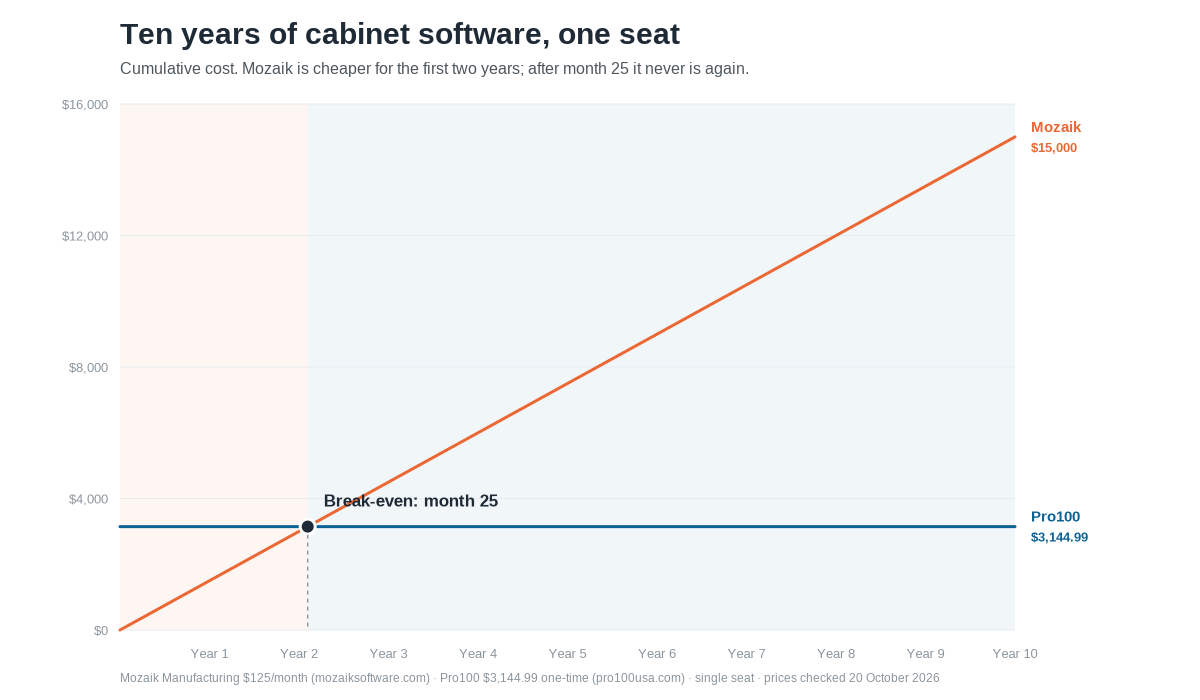
Against that, Pro100 is $3,144.99 once, or $3,444.95 with the Kray renderer, with no recurring fee. Here is what a single seat has cost you at each point:
| Point | Mozaik | Pro100 | Ahead |
|---|---|---|---|
| Year 1 | $1,500 | $3,144.99 | Mozaik by $1,645 |
| Year 2 | $3,000 | $3,144.99 | Mozaik by $145 |
| Year 3 | $4,500 | $3,144.99 | Pro100 by $1,355 |
| Year 5 | $7,500 | $3,144.99 | Pro100 by $4,355 |
| Year 10 | $15,000 | $3,144.99 | Pro100 by $11,855 |
The crossover is month 25. Before that, Mozaik has cost you less. After it, the gap only widens — about $4,355 by year five and $11,855 by year ten. With three designers the subscription is $245/month, because the two extra seats are $60 each.
If you want this worked through properly, including the costs that are not on anyone’s price page, it is the subject of a separate article on what cabinet design software actually costs over five years.
What Mozaik does better
A page like this is worth nothing if it only lists the other product’s faults, so:
- CNC. Mozaik is strong on machining output and has been built around it. Pro100 offers a CNC package as an option, but if nesting and toolpaths are the centre of your business rather than the end of it, that is a real reason to stay.
- Low entry cost. $125 to start beats $3,144.99 to start. If cash is the binding constraint this month, that matters more than a break-even two years out.
- You already know it. Genuinely worth money. A designer fluent in one program is more productive than the same designer learning a better one.
If all three apply to you, stay where you are. Switching software to save $1,355 in year three is a bad trade if it costs you a month of output.
Who should actually consider switching
The shops for whom the move pays are fairly specific:
- You expect to be in business in five years and the recurring cost now bothers you.
- Your work is design and presentation led — kitchens, closets, built-ins — and you cut on a saw rather than a router.
- You have more than one designer, so per-seat fees are multiplying.
- You want the licence to be yours. Pro100 is licensed to a USB dongle: install it on as many machines as you like, and it runs on whichever one has the key. Nothing expires.
The small shops article goes further into which of these matter at which size.
The other alternatives, briefly
Pro100 is not the only option and it would be odd to pretend otherwise. Cabinet Planner is far cheaper and far more limited. Cabinet Vision is more capable and considerably more expensive. Cabinet Pro is strong on CNC. 2020 is subscription, like Mozaik, so it does not solve the problem you are trying to solve. All of them are set out side by side, with prices, in the 2026 comparison of cabinet design software.
How to switch without losing a month
This is the part the directory listings skip, and it is the part that decides whether the move works. Six steps, in order.
| Step | What to do | Why |
|---|---|---|
| 1 | Export your archive while the subscription is live — PDFs of drawings and quotes, CSV of parts data, renderings as images. | After cancellation the files on your drive cannot be opened. |
| 2 | Write down your construction standard before you look at new software: material thicknesses, reveals, overlays, joinery, hardware. | This is the thing you are really migrating. It lives in your head, not in a file. |
| 3 | Rebuild the catalog in the new program — one base, one wall, one tall cabinet first. | Three cabinets will surface every assumption your old setup was making. Get those right and the rest is repetition. |
| 4 | Redraw one finished job you already built, and compare the cut list against what you actually cut. | The only honest test. If the parts match, the catalog is right. |
| 5 | Run both programs for one billing cycle. Quote new work in the new one, finish open jobs in the old. | One month of overlap costs $125. Being stuck halfway costs far more. |
| 6 | Cancel, timed to your renewal date. | There is no refund for the unused part of a term you have already committed to. |
Budget two to four weeks of evenings for steps 2 to 4 if you have a settled construction standard, longer if you do not. The catalog setup is the bulk of it; the beginner's guide and the tutorial videos cover the rest, and we will build the first few cabinets with you if you ask.
Do not cancel before step 5 is finished. Nearly every migration that goes badly goes badly here — the subscription is stopped to save a month, a customer calls about a kitchen from last year, and the file will not open.
What to check before you buy the replacement
- Will it run on your machines? Pro100 is a Windows program — see the system requirements, and the macOS page if you are on a Mac.
- Does the output match how you sell? If you close jobs on renderings, test the 3D output on your own kitchen, not a demo file.
- Does it price the way you price? Linear foot, per piece or material consumption all behave differently — job costing covers which suits which shop.
- What happens to sheet waste? The panel optimizer is an option, not a given, in most packages including this one.
- Can you get your money back? Read the return policy before buying, ours or anyone’s.
The walkthrough from first measurement to finished cut list is the fastest way to see whether the way Pro100 works suits the way your shop works.
Common questions
What are the main alternatives to Mozaik for cabinet shops?
Pro100, Cabinet Vision, Cabinet Pro, Cabinet Planner and 2020 are the packages most often compared with it. Of those, Pro100, Cabinet Pro and Cabinet Planner are one-time purchases; Mozaik and 2020 are subscriptions.
Can I open my Mozaik files after I cancel?
Generally no. The application stops launching when the subscription lapses, and the project files on your drive cannot be opened without it. Export anything you need — PDFs, CSV parts data, renderings — before you cancel.
How much does Mozaik cost in 2026?
As of 20 October 2026, Mozaik’s own pricing page lists Manufacturing at $125/month, CNC at $225/month and Enterprise at $325/month, with additional seats at $60/month. An annual commitment takes 10% off the first seat only, and a three-month paid trial comes first.
When does buying cabinet design software beat subscribing?
At month 25, comparing Pro100 at $3,144.99 once with Mozaik Manufacturing at $125/month for one seat. Before that the subscription has cost less; after it the gap widens by $1,500 a year.
How long does it take to switch cabinet design software?
Two to four weeks of part-time work to rebuild a catalog, if your construction standard is settled, plus one billing cycle running both programs in parallel. The catalog is the slow part, not learning the interface.
Should every Mozaik user switch?
No. If CNC output is the centre of your business, if cash flow makes a one-time purchase hard right now, or if your team is already fluent in Mozaik, staying is the reasonable choice.
The short version
Mozaik is cheaper for two years and more expensive forever after that. The decision is not really about the monthly figure — it is about whether you want to own the tool or rent it, and whether you can afford a month of disruption to change. If you do switch, export your archive first and run both in parallel for a cycle. Everything else is recoverable; locked files are not.
If you want to test this rather than read about it, the Pro100 trial does not expire — send us a kitchen you have already built and we will draw it alongside you, so you can compare the cut list against the parts you actually cut. Shops who have already made the move are listed on the Pro100 users page.
Related reading
Cabinet software compared in 2026 · What cabinet design software costs over five years · Cabinet design software for small shops · From first measurement to finished cut list · How to price a cabinet job · Cabinet design software · All features · Pricing · For cabinet shops · Support
Try it on a kitchen you have already built
Send us a job you know the real cost of. We will draw it in Pro100 and send back the cut list and the costing, so you can compare them against what the job actually took.
Or see pricing, or ask us about switching.